
So basically I had a host failure where all of the configure was lost, if I was more savvy with Powershell/PowerCLI, I would have been able to rebuild it all via scripts, but that clones the settings from a working host.
But nevermind that is for a different day of learning.
So I configured the host to the point of Networking, so the vSwitches had the correct NICs, but I needed to do all the port groups, which in the GUI if you have a few to do is time consuming.
So in PowereCLI, pull all of your information, port-group names and VLAN IDs.
Get-Vmhost -name <FQDN of host> | Get-VirtualSwitch -name | Get-VirtualPortGroup
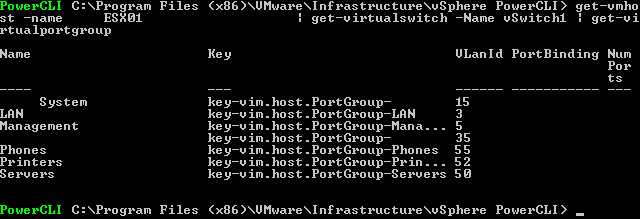
To create a port-group
Get-Vmhost -name <FQDN of host> | Get-VirtualSwitch -Name | New-VirtualPortgroup -Name "Name of PG" -VlanID
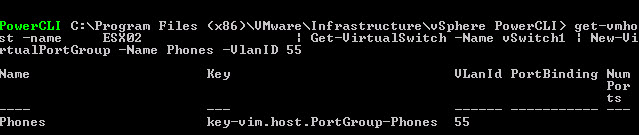
Obviously this is a very short crude method of achieving what I need, but here you can see the basic building blocks needed to create Port Group in PowerCLI.
Regards
Dean
Try this one for size champ..
------------------------------------------------------------------------------------------------------
# Vsphere 5 Migration Script
# Aaron Kent
# 5-09-2013
#
#
# Ask for host to use as migration host
Get-vmhost | select Name
$migrationHost = Read-Host 'Please input Migration Host Name from list above - *01* will work if unique'
Get-vmhost | select Name
$destinationHost = Read-Host 'Please input Destination Host Name from list above - *01* will work if unique'
Get-View -ViewType DistributedVirtualSwitch | foreach {
$VDSwitchName = $_.Name
$VDSwitchMoRef = $_.MoRef
#Create virtual Switch on host specified above
Get-Datacenter pibutepr07 | New-virtualSwitch -VMHost $destinationHost -Name vsphere5_$VDSwitchName -NumPorts 1024 -Mtu 9000
# Get all Distrubuted Port Groups on Cluster with VlanId
Get-View -ViewType DistributedVirtualPortgroup | where {$_.Config.DistributedVirtualSwitch -eq $VDSwitchMoRef} | where {$_.Name -notlike "*Uplinks*"} | %{
$portgroupname = $_.Name
$portgroupVlanId = $_.Config.DefaultPortConfig.Vlan.VlanId
# Take all Distrubuted Port Groups gathered above and add Standard Port Group to new Standard switch
Write-Progress -Activity "Creating $portgroupname with vlan $portgroupVlanID" -Status "on $VDSwitchName"
write-host vsphere5_$VDSwitchName
Get-virtualSwitch $destinationHost -name vsphere5_$VDSwitchName | New-virtualportgroup -Name vs-$portgroupname -VlanId $portgroupVlanID
}
}
#Configure the network adapters for each Virtual Switch as required
#If a vswitch has two network adapters drop the second and place on the relative virtual switch
#Be cautious with lavvc004 and lavvc005 as they are a bit more complicated
Write-Host "Please configure the vmnics for the new virtual switches and press anykey to continue"
Write-Host "You are about to start moving vm's from the DV Switch to the new vphere 5 virtual switch press anykey to continue"
#$x = $host.UI.RawUI.ReadKey("NoEcho,IncludeKeyDown")
Write-Host "Make sure you have allocated at least one nic with the correct vlans to the new vsphere 5 switch."
------------------------------------------------------------------------------------------------------------
I originally used to the script above to create virtual port groups from existing dvportgroups on the same host. But then had a similar issue to you and modified to copy from another host.. mind you it will still look up dvportgroups and not virtual port groups but you can change this will a little tweaking.. This is the reason a distributed switch is a great idea, you just add the host back to the distributed switch and done..
Hi, Thanks for a great response and sharing your powercli code!!!
This is hopefully the level I will get to some day