
Are you tired of searching for ways to add characters to the start and end of lines in Notepad++? Look no further! I decided to write this blog post for it!
To get started:
- Press Ctrl + H to bring up the Replace dialog box (or Ctrl + F and click the tab
- Select the Regular Expression Radio Button
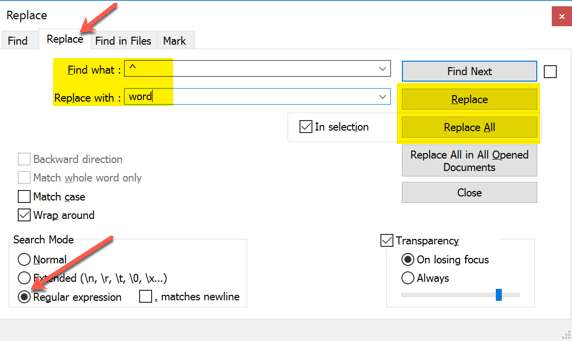
Add to the start of each line
- Type ^ in the Find what box
- Type the word or characters you want to be appended to the start of each line
- Click the Replace or Replace All button as needed
Add to the end of each line
- Type $ in the Find what box
- Type the word or characters you want to be appended to the end of each line
- Click the Replace or Replace All button as needed
Regards
THANK YOU DUDE ! I LOVE YOU AND WISH MUCH SUCCESS
Thx bro
teşekkürler bro